Three things, one account

  • A phone line that never goes cold

    Keep your number; your phone rings first. Missed calls get an automatic text back, and on Growth and Business the Phone Receptionist answers and takes the details.

  • A website that captures the job

    Handled builds and hosts your site, with AI chat that answers visitors and forms that turn a visit into a booking request.

  • One inbox for every lead

    Calls, texts, website chats and booking requests land in one place, with the history your team needs to reply and book.

A missed call is a job that went to someone else.

The trades run on the phone, and the phone rings when you can least answer it. Handled makes sure the customer still gets a reply.

  • You're on a job

    Hands full, crawlspace deep. You can't pick up, and the caller moves on to the next name in the results.

    Handled texts them back straight away, or the Phone Receptionist answers and takes the details.

  • It's after hours

    Evenings and weekends are when homeowners search. If nobody answers, they keep scrolling.

    After hours, the Phone Receptionist answers the calls you miss, or text-back holds the lead until morning.

  • The voicemail sat there

    By the time you hear the message, that job is booked with someone who replied first.

    The conversation is already in your inbox, with what the caller needs and how to reach them.

How it works

Three steps. That's it.

  1. Forward the calls you miss

    Keep your number. Your phone rings first; calls nobody answers forward to Handled. Onboarding walks you through the carrier steps.

  2. Handled answers or texts back

    A missed call gets an automatic text within moments. On Growth and Business, the Phone Receptionist can pick up instead and collect the job details.

  3. Reply and book from one inbox

    Every call, text, website chat and booking request lands in the inbox with its history, so you or your team can reply and book the job.

How a call gets to Handled

Your business number
Rings your team
Unanswered calls forward
Handled answers or texts back
Inbox
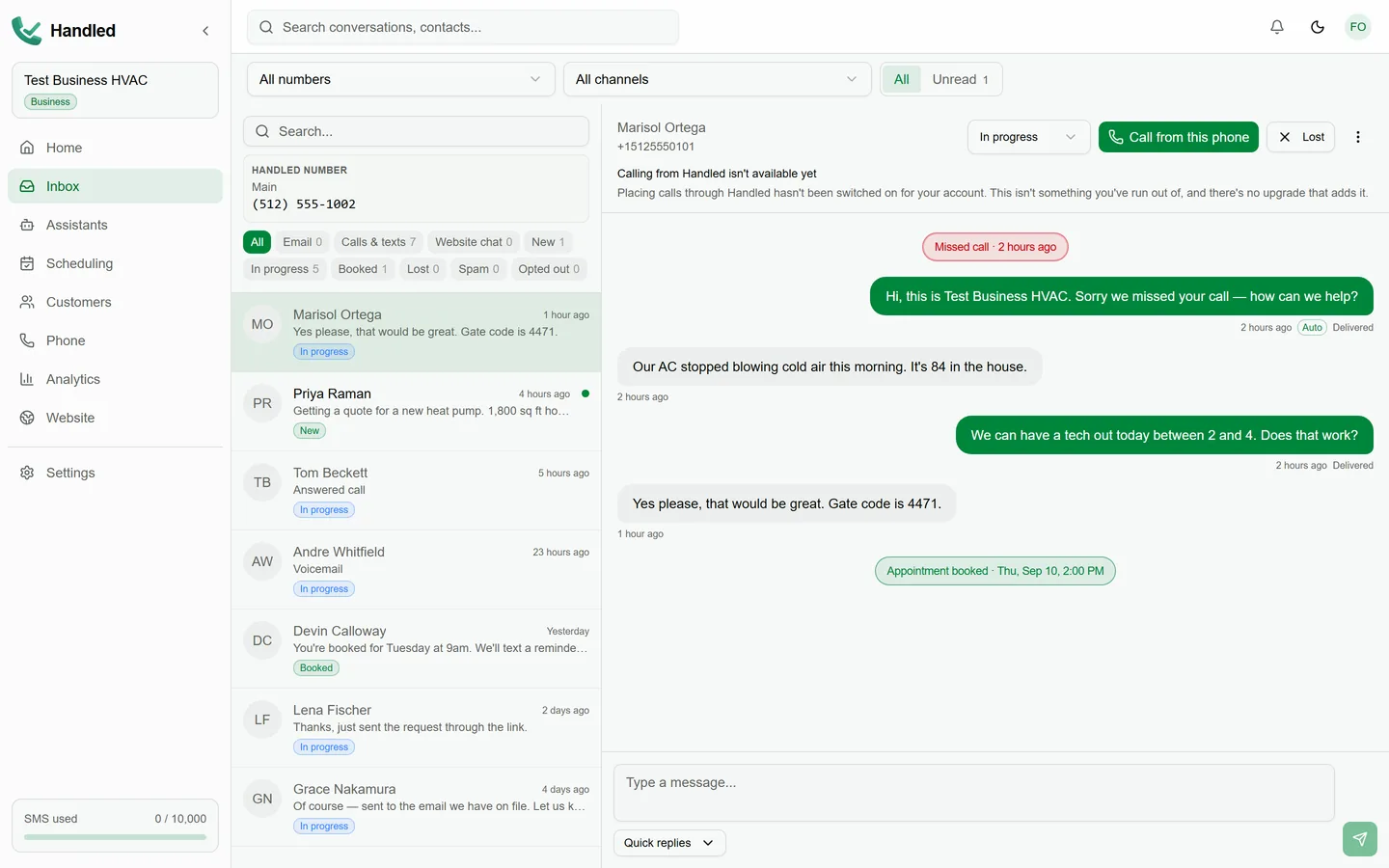
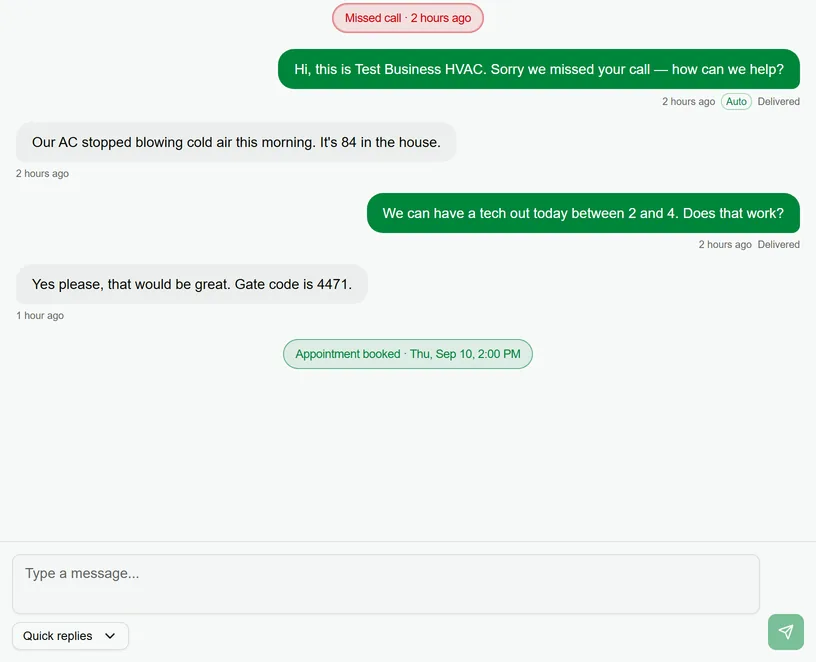
The Handled inbox: a customer conversation that started as a missed call, with the text-back and the customer's reply in one thread
Product

Every way a customer reaches you, handled.

Voice, text, website chat, one inbox and booking requests. Here is what each one does and which plans include it.

Voice

The Phone Receptionist answers when you can't.

It picks up, asks what the caller needs, collects the details and puts the conversation in your inbox. It answers when your team can't.

  • Answers only the calls your team does not pick up, or leave it off
  • Collects what the caller needs and the best way to reach them
  • Minutes are included with the plan and shown in your account

Included with: Growth (100 minutes) and Business (300 minutes)

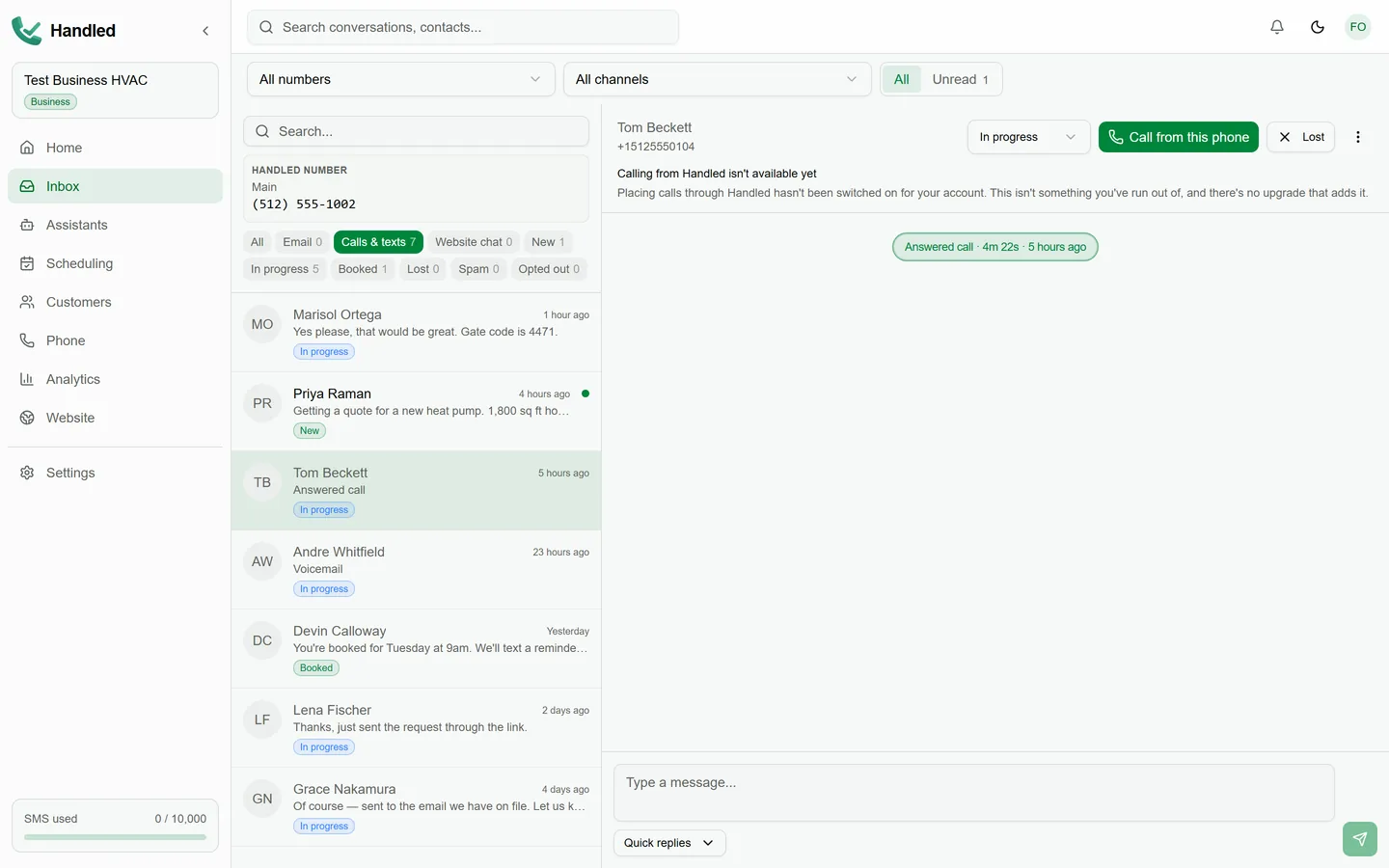
The Handled inbox filtered to calls and texts: an answered call open in its thread, with voicemail and text conversations in the list

Text

A missed call gets a text before the caller finds someone else.

Handled texts back automatically from your business number. The Text Assistant keeps the conversation going and gathers what you need to quote or book.

  • Automatic text-back on every missed call, once your line is carrier-verified
  • The Text Assistant replies to questions and collects service details over SMS
  • STOP, HELP and START keywords are handled for you

Included with: Text-back and Text Assistant on Starter, Growth and Business

The missed-call text-back automation in Handled, showing the message a caller receives

Website chat

Visitors get answers on your site, and you get the lead.

AI chat on your Handled website answers from your published business details, tells the visitor it is automated, and turns a conversation into a lead in your inbox.

  • Answers questions about your hours and services from what you publish
  • Identifies itself as automated to every visitor
  • A monthly allowance of chat replies is included with every plan

Included with: Every plan, with the reply allowance shown on each card

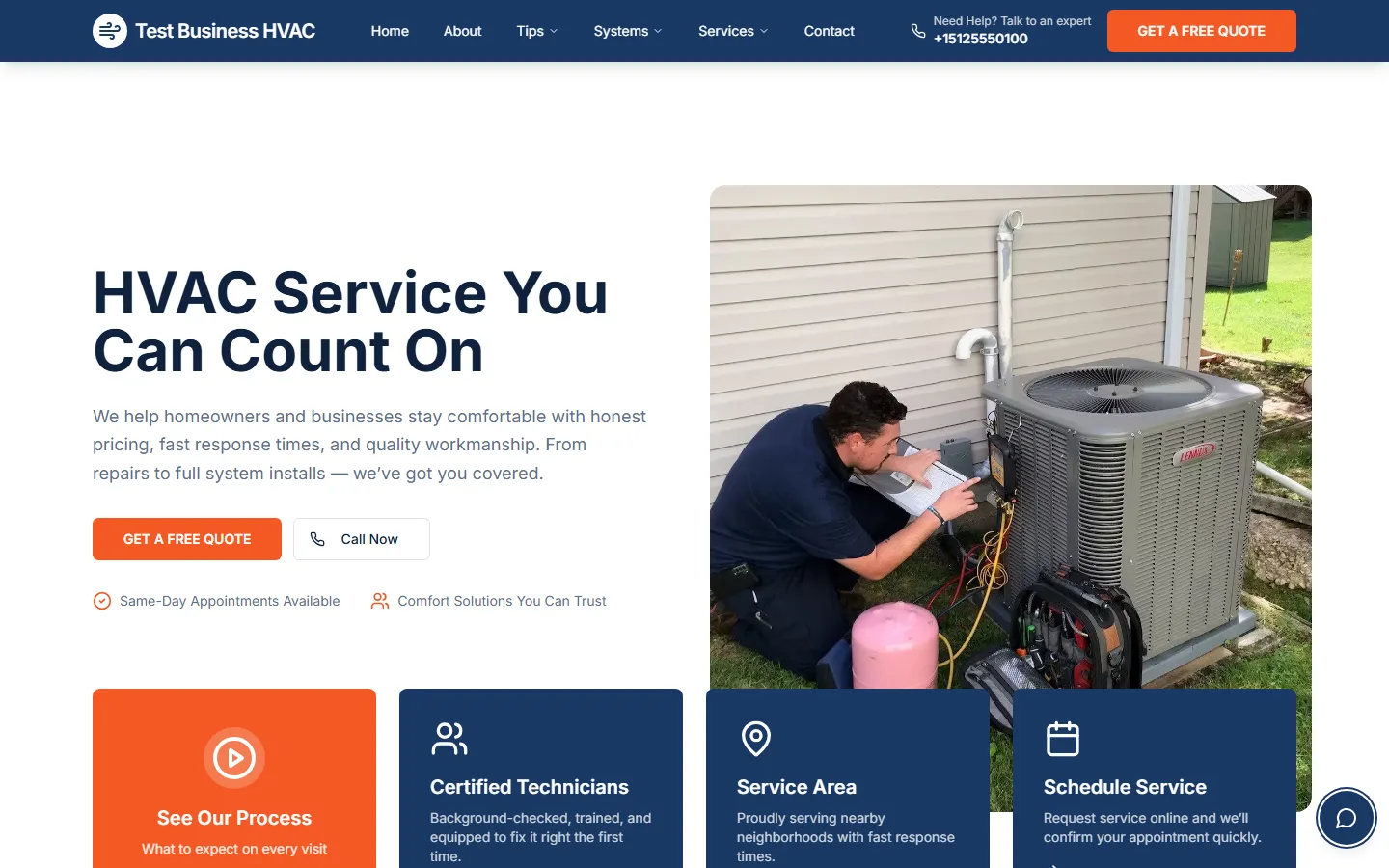
A hosted Handled website for a fictional HVAC business, with the chat launcher in the corner of the page

Inbox

Every lead, one thread, the whole history.

Calls, texts, website chats and booking requests are one conversation per customer. Reply from the inbox, see what was said, and bring your team in.

  • Calls and texts from the same customer stay in one thread
  • Owners and admins can add team members so nobody shares a login
  • Opt-outs are recorded and respected automatically

Included with: Every plan

The Handled inbox with a list of customer conversations and an open thread

Booking requests

From a conversation to a job on the calendar.

Booking links and website forms turn a lead into a booking request with the service, the time the customer wants and their contact details, ready for you to confirm.

  • Booking links to share by text or from your website
  • Requests land in your scheduling area, not in an email you have to hunt for
  • Your business hours and services shape what a customer can request

Included with: Every plan

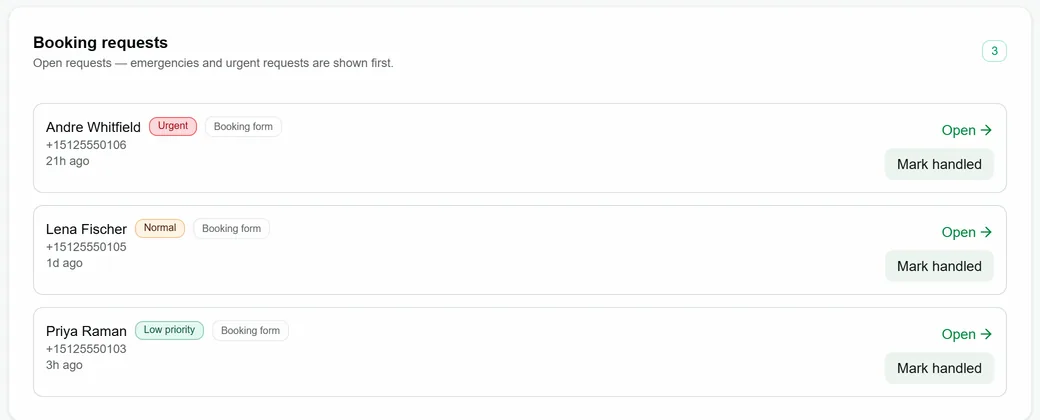
Open booking requests in Handled, each with the customer, their phone number, how urgent it is and where it came from
Website

Websites, handled.

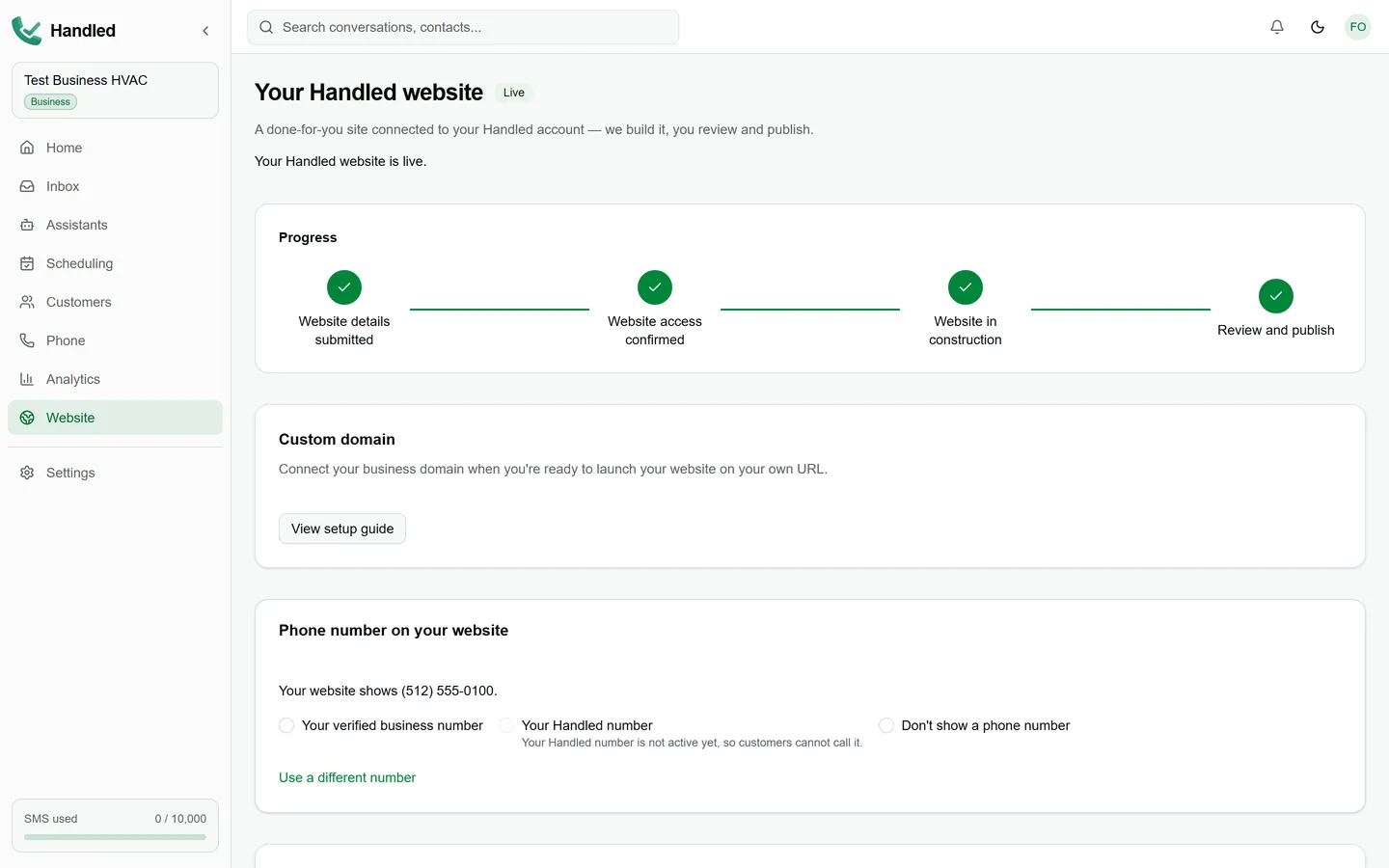
A professional site built around your services, service area and hours, with the chat and booking requests that turn a visit into a lead. Included with every plan.

  1. Tell Handled about the business

    Your services, service area, hours, photos and how customers should reach you.

  2. Handled builds and hosts the site

    A site around your business with hosting, SSL and updates included, AI chat, contact forms and booking requests built in.

  3. You review, then publish

    Nothing goes live until you publish it, on your schedule.

  4. Connect the domain you own

    Point a domain you already have using the DNS records Handled shows you. Handled does not sell domains.

A hosted Handled website for a fictional HVAC business: hero, quote button, service highlights and the chat launcher
Ready for reviewCustom domain connected
The product

One workspace for calls, customers and your website.

See what needs attention, reply to customers, confirm booking requests, watch the numbers and manage your website and team from one dashboard.

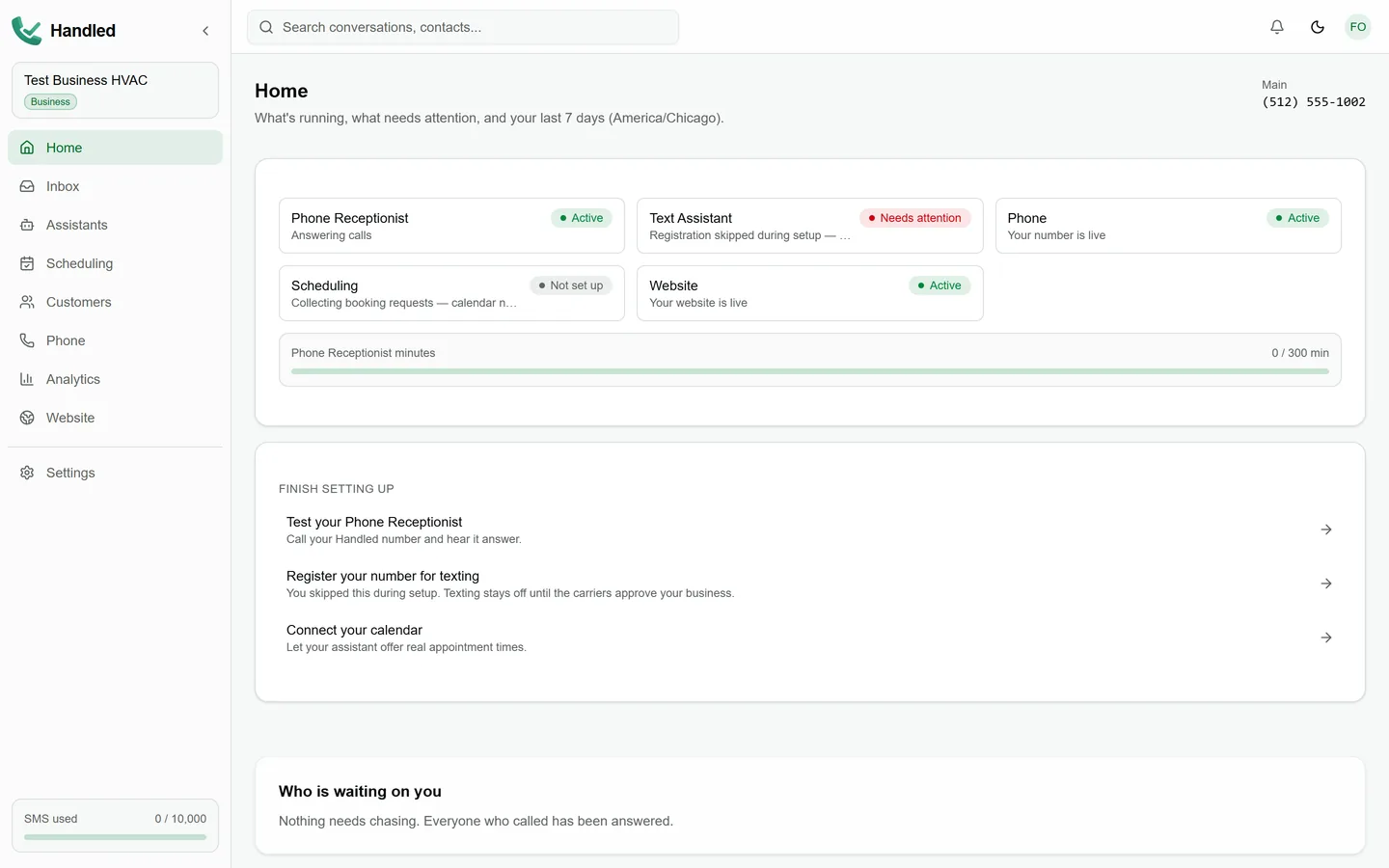
Home in Handled: the status of your Phone Receptionist, texting, scheduling and website, the setup checklist and who is waiting on you
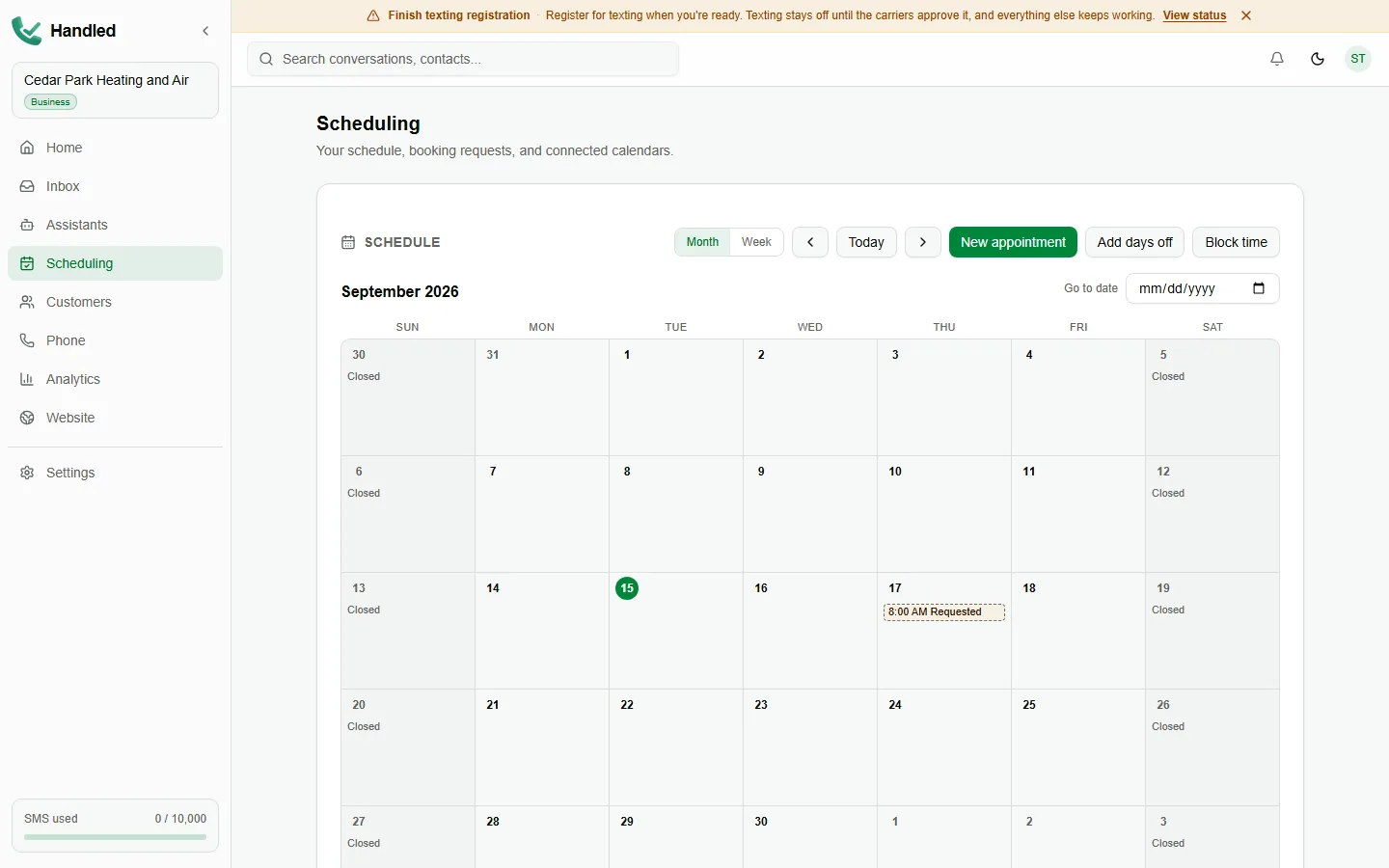
Scheduling in Handled: the month calendar with a requested appointment, the days the business is closed, and the controls to add an appointment, days off or blocked time
The Handled inbox with customer conversations and an open text thread
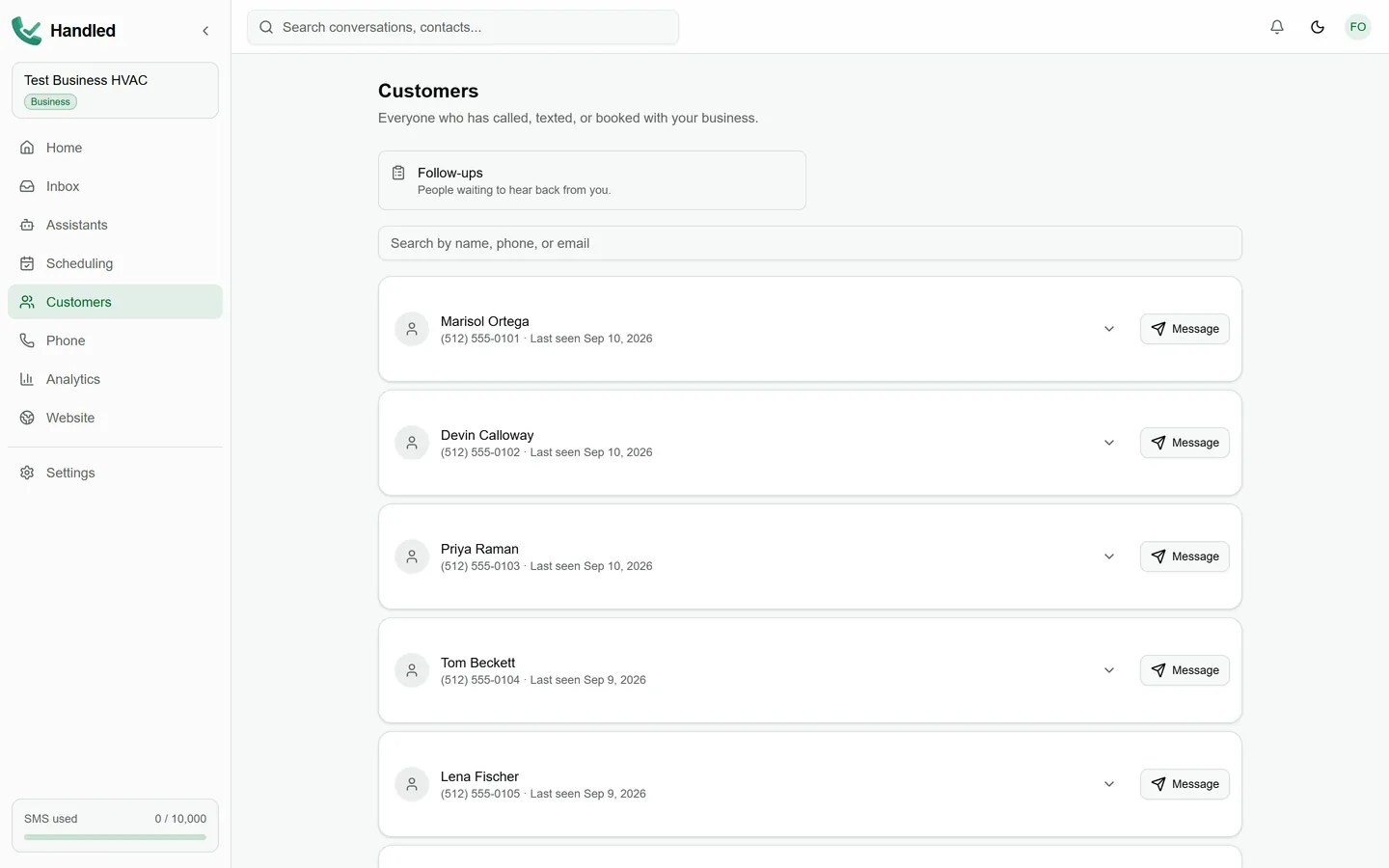
Customers in Handled: everyone who has called, texted or booked, searchable by name, phone or email
Setup

Set up in one sitting, guided the whole way.

Onboarding asks one thing at a time and shows you where you are. You can stop and come back; it picks up where you left off.

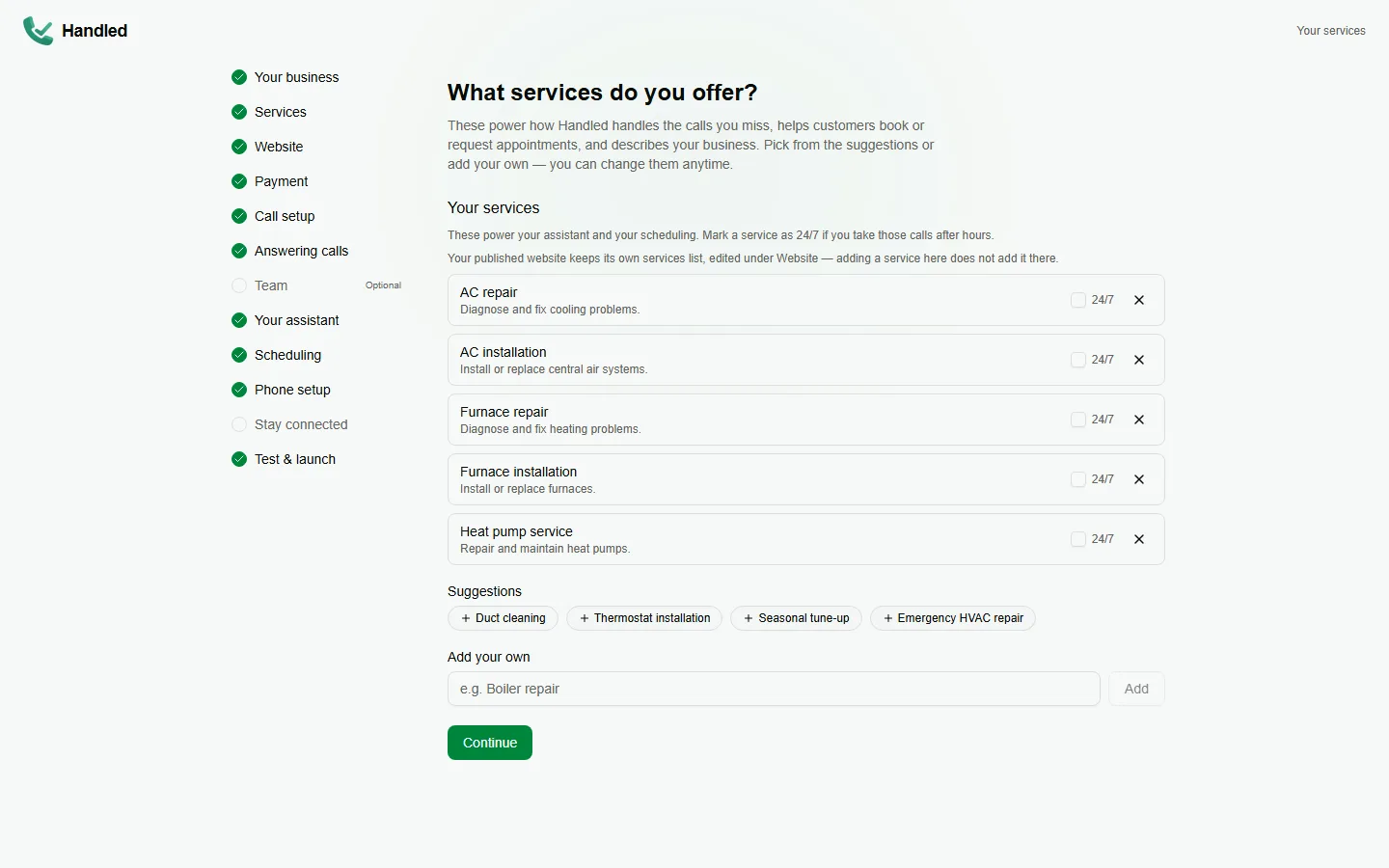
  1. 1.Describe the business

    Your trade, services and hours. Handled uses them for the website, the chat and what the Phone Receptionist knows.

  2. 2.Choose your website path

    Have Handled build your site, or skip it for now if you already have one you are happy with.

  3. 3.Pick a plan

    Website, Starter, Growth or Business, billed monthly. What each includes is on the card.

  4. 4.Set up the phone line

    Set up missed-call forwarding from your business phone, confirm it with a test call, and complete carrier verification so texting can start.

  5. 5.Test it, then launch

    Place a test call, see it land in your inbox, and go live when it looks right.

Onboarding in Handled: the guided setup steps down the left, with the Services step open
Trust and control

Your customers, your number, your call.

Handled sends messages in your name, so it has to behave the way you would. These are the rules it follows without being asked.

  • Opt-outs are recorded and enforced

    On your Handled business number, STOP and related keywords stop further automated texts to that customer; HELP and START/UNSTOP are handled in product. Opt-outs are listed in your account. That does not certify legal compliance for every use — you remain responsible for consent in your market.

  • Texting starts after carrier verification

    Handled registers your business with the carriers before any automated text is sent, and shows the status while it is in review.

  • The chat says it is automated

    Website visitors are told they are chatting with an automated assistant, not a person, and the Phone Receptionist does not claim to be one either.

  • You publish. Nothing goes live on its own

    The website is prepared for your review and published only when you say so. Your domain stays yours.

  • Roles, not shared logins

    Owners and admins add team members and invite them to sign in. Billing and the danger zone stay with the owner.

  • Delete your account any time

    A public page explains exactly what deletion removes and how to request it, no sign-in required to read it.

Read the privacy policy, terms of service, SMS terms and our messaging compliance overview.

FAQ

Frequently asked questions

Do I have to replace my business number?
No. Keep the number your customers already call. Your business phone rings normally, and when your team does not answer you forward missed calls to your Handled line. The forwarding setup is part of onboarding.
What happens when I miss a call?
On Starter, Handled texts the caller back automatically and the Text Assistant keeps the conversation going over SMS; the thread lands in your inbox. On Growth and Business, the Phone Receptionist can also answer the forwarded call, collect the job details and put that conversation in the same inbox.
When does the Phone Receptionist answer?
Only when your team does not. Your business phone rings normally; on Growth and Business, a call nobody picks up forwards to Handled and the Phone Receptionist answers it. You can also leave it off so missed calls go to voicemail and text-back. The mode is a setting you can change at any time.
Why does carrier verification matter?
Carriers require a registered business before automated texts can be sent. Handled walks you through the registration during setup and shows the status in your dashboard; texting starts once it is approved.
How does texting opt-out work?
On your Handled business number, replies of STOP, UNSUBSCRIBE, CANCEL, END, QUIT, STOPALL, REVOKE or OPTOUT are recorded and stop further automated texts to that customer; HELP receives a short reply; START or UNSTOP can lift a prior STOP so messaging may resume only where your settings and applicable rules still allow it. Opt-outs are listed in your account. Those controls help you honour opt-outs — they do not by themselves make every use of Handled legally compliant for your business or jurisdiction. You remain responsible for consent and lawful messaging.
Does the website go live immediately?
No. You submit your business details, Handled prepares the site, and it goes live only when you publish it. You can connect a domain you already own using the DNS records Handled shows you.
What does the website chat do?
It answers visitor questions from your published business details, tells visitors it is automated, and turns a conversation into a lead in your inbox. Every plan includes a monthly allowance of chat replies; the allowance is on each plan card.
Can my team use Handled?
Yes. Owners and admins can add team members and invite them to sign in, so more than one person can work the inbox without sharing a login.
Can I see it before I pay?
Yes. Book a demo and we will walk you through the product on a call. Public self-serve signup does not open a trial on its own. Eligible businesses may receive an invitation-based trial lasting thirty days; that trial starts only when someone explicitly activates it in Handled, not merely by opening a link. Paid plans are billed monthly when you choose one.
What happens when a trial ends or I cancel?
Paid features such as the Phone Receptionist and automated text-back stop when access ends. You can still sign in to manage the account and stored data. After a subscription is canceled, Handled schedules the business phone line through a short grace period and then a hold before the number can be released — forwarding that depended on that Handled line will not keep working indefinitely. Do not assume voicemail or call handling continues unchanged after the line is deactivated.
How do I get support?
Email support@handleddesk.com or call the number on our contact page. We reply during business days.